

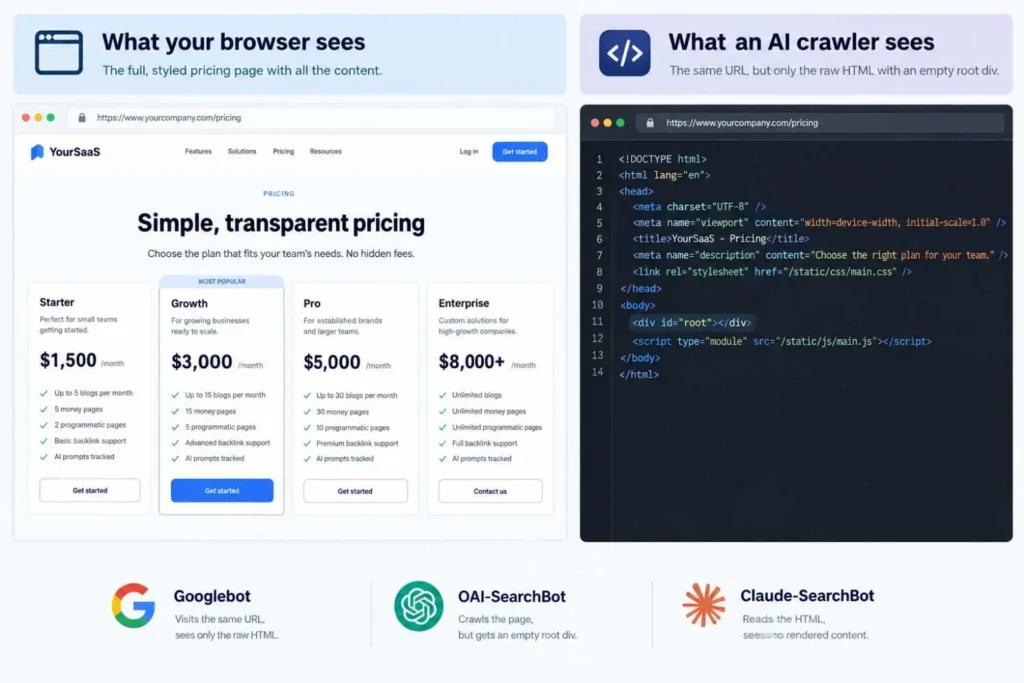
SaaS technical SEO comes down to two jobs. Google and AI assistants should be able to read every marketing page, and they should never see your app, staging or login screens. Most of the trouble sits where those two meet, in things like JavaScript-only pricing, an app subdomain that ended up in Google, or a CDN quietly turning ChatGPT’s crawler away. Fix what a crawler sees with JavaScript off before touching page speed.
Key Takeaways:
- Most AI crawlers only read raw HTML, so pricing that loads with JavaScript is invisible to them.
- Want the app out of Google? Use a noindex header. A robots.txt Disallow alone won’t do it.
- You can block training bots and still show up in ChatGPT and Claude, as long as the search bots get through.
Your site looks fine in Chrome. That’s the trap, because nobody on the team sees it the way a crawler does. Googlebot gets to the JavaScript eventually, most AI crawlers don’t. Each fix below is written for an engineer, with a quick check.
Why SaaS Technical SEO Breaks Differently
A dentist’s website lives on one host. A SaaS company is lucky to have fewer than five.
Marketing site and app, obviously. Then docs, a changelog, preview deploys and often a landing-page tool the paid team bought without telling anyone. Different owners, and nobody looks at the whole set, so standard checklists flag a heavy hero image and miss thousands of login URLs in Google.
The classic version: somebody adds Disallow: / to the app host’s robots.txt and moves on. Months later Google still shows those URLs, with the grey “No information is available for this page” note. Crawling stopped, sure, but indexing never did. Fix 5 is the way out.
Severity at a Glance
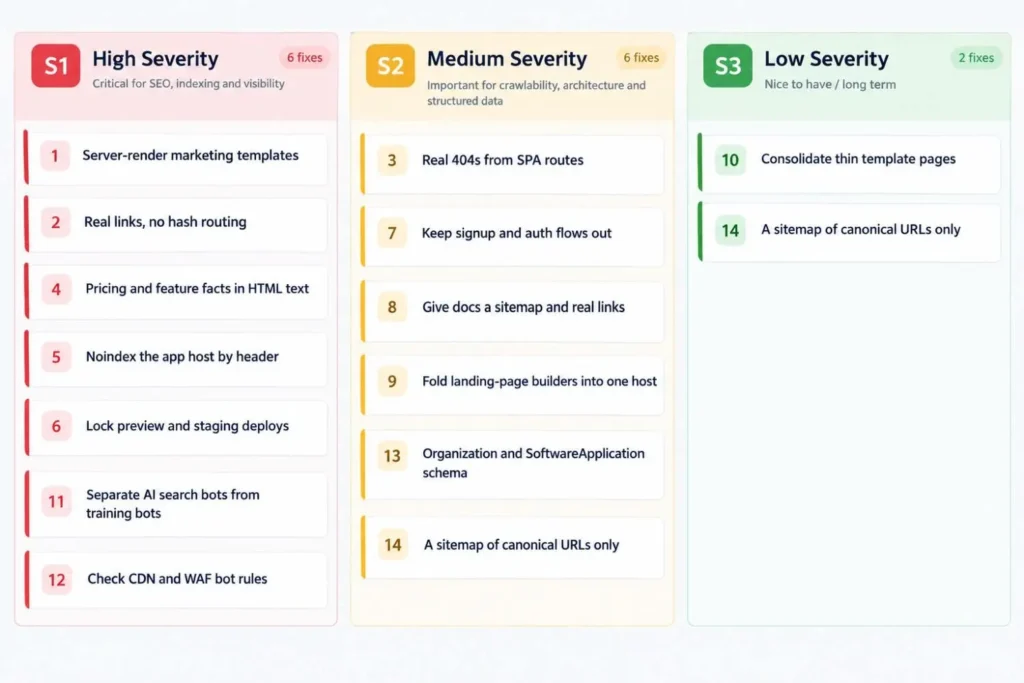
An S1 hurts you right now, an S2 slowly. S3s can wait for a quiet sprint.
| # | Fix | Severity |
| 1 | Server-render marketing templates | S1 |
| 2 | Real links, no hash routing | S1 |
| 3 | Real 404s from SPA routes | S2 |
| 4 | Pricing and feature facts in HTML text | S1 |
| 5 | Noindex the app host by header | S1 |
| 6 | Lock preview and staging deploys | S1 |
| 7 | Keep signup and auth flows out | S2 |
| 8 | Give docs a sitemap and real links | S2 |
| 9 | Fold landing-page builders into one host | S2 |
| 10 | Consolidate thin template pages | S3 |
| 11 | Separate AI search bots from training bots | S1 |
| 12 | Check CDN and WAF bot rules | S1 |
| 13 | Organization and SoftwareApplication schema | S2 |
| 14 | A sitemap of canonical URLs only | S3 |
Fixes 1 to 4: Rendering
1. Server rendering for marketing pages. Google’s own docs admit not all bots can run JavaScript, and even Googlebot queues pages before rendering them. SSR or static generation takes the guesswork out. To see it yourself, curl a page. If the response is mostly <div id=”root”></div> and script tags, that’s all most AI crawlers will ever read.
2. Links Google can follow. Googlebot finds pages through <a> elements with an href, pretty much exclusively. Navs built from click-handler buttons or #/pricing routes hide pages from it.
3. What does your app return for a page that doesn’t exist? Type rubbish after your domain and check the status code. Plenty of React sites return 200 with a friendly “not found” screen, a soft 404 in Google’s eyes. A real 404 (or noindex) fixes it.
4. Pricing and comparison facts, in plain HTML. Prices behind a monthly/annual toggle. Comparison tables as images. FAQs that load on click. Buyers ask ChatGPT about exactly this, and crawlers often never receive it. Turn JavaScript off and reload your pricing page. If the numbers disappear, you won’t be quoted.
Fixes 5 to 10: App, Docs and Subdomains
5. Noindex the app host by header. Google says a page blocked in robots.txt can still appear in search results, since the noindex never gets read. It feels wrong, but send X-Robots-Tag: noindex from the app host and lift the Disallow so Google sees it. site:app.yourbrand.com should shrink.
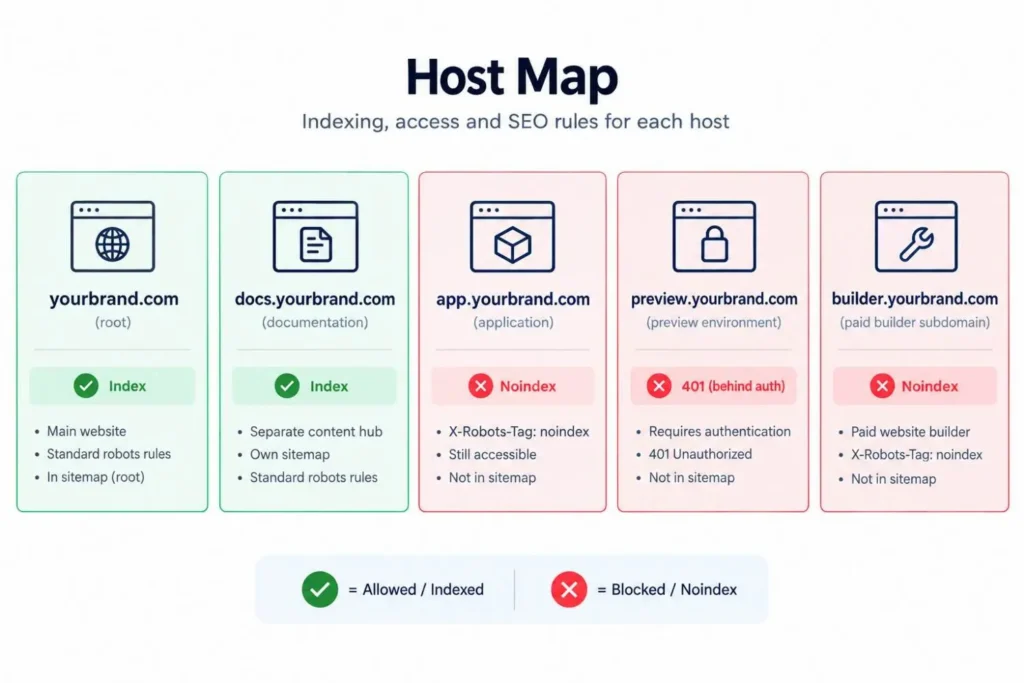
6. Preview and staging deploys belong behind a login. Preview links get pasted into Slack, Jira and now and then a public GitHub issue, and crawlers follow them. Logged out, those URLs should return a 401.
7. Signup, onboarding and password-reset pages. Noindex them. Keep them out of the sitemap.
8. Docs are part of the site. The real answer to “do you integrate with Salesforce?” lives in your docs. A docs subdomain needs its own robots.txt and sitemap. More important, link to it from the main nav, because orphaned docs rarely get cited.
9. The ads team’s landing-page builder. The paid team launches pages on a builder subdomain, SEO never hears about it, and a year later they’re cannibalizing organic pages. Noindex the paid-only ones or move them to the main domain. One person should see both.
10. Thin template pages. An integration page with a logo and two sentences helps nobody. Write real copy for integrations people search for, noindex the rest, and canonicalize changelog entries to the main changelog.
Most of these land on an engineer’s plate, where audits usually go to die. Our technical SEO team writes them as tickets and checks them after release. Get a free SaaS technical SEO check to see which apply.
Fixes 11 to 14: AI Crawlers and Machine-Readability
11. Search bots and training bots are separate calls. Blocking GPTBot keeps you out of OpenAI’s training data, and that’s all it does. Visibility is OAI-SearchBot’s job. OpenAI says sites opted out of it won’t appear in ChatGPT search answers. Anthropic splits ClaudeBot and Claude-SearchBot the same way. A start:
# Search bots: allow
User-agent: OAI-SearchBot
User-agent: Claude-SearchBot
User-agent: PerplexityBot
Allow: /
Disallow: /signup/
# Training bots: your call
User-agent: GPTBot
User-agent: ClaudeBot
User-agent: CCBot
Disallow: /
A crawler obeys only the most specific group naming it, so copy any User-agent: * rules into each group, then test.
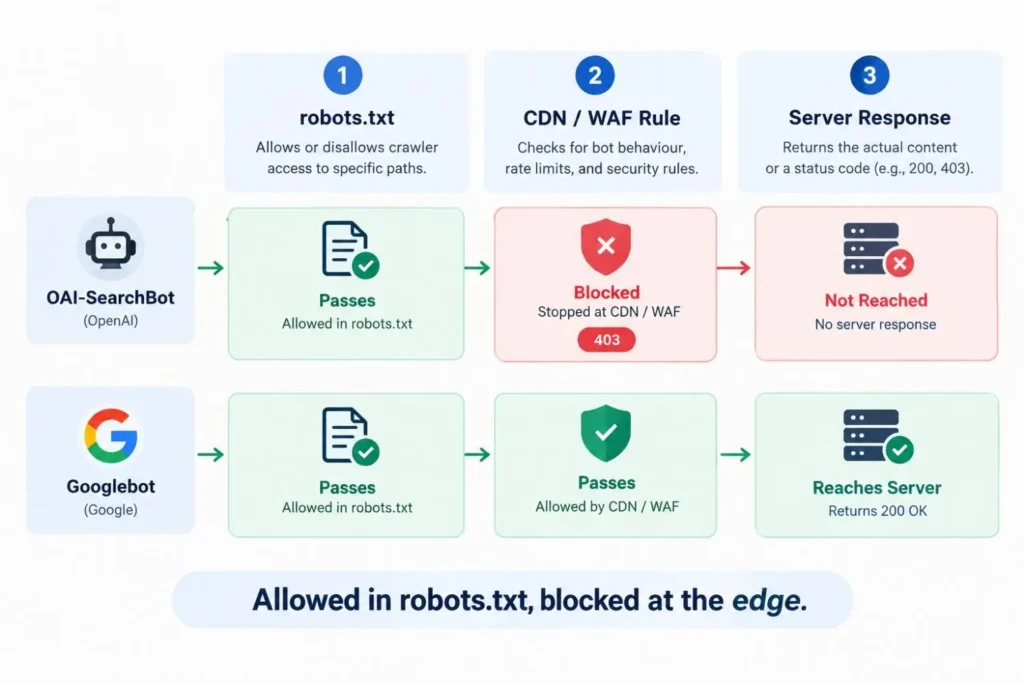
12. Your CDN might be overruling robots.txt. robots.txt says yes, the CDN says no, and nobody notices. Cloudflare began blocking AI crawlers by default for new domains in July 2025. In the logs, OAI-SearchBot and PerplexityBot should get 200s, not 403s.
13. Organization and SoftwareApplication schema. With sameAs links to your G2, LinkedIn and Crunchbase profiles, AI systems can tell they’re one company. Offer prices in the markup should match the page exactly. More in our LLM technical SEO guide.
14. A sitemap that only lists real pages. Canonical marketing and docs URLs, nothing else. Bump lastmod when content changes, not on every deploy.
To check it worked: OpenAI says robots.txt changes reach its search crawler in about a day, so check logs the next morning, then weekly. You want the app host’s indexed count dropping, crawler 200s, and eventually more GA4 visits from chatgpt.com and perplexity.ai.
The Fix Order That Matters
If you only get five done this quarter, make them 1, 4, 5, 11 and 12. They decide if you can be read at all. Subdomains next, schema after. Core Web Vitals matter, I just wouldn’t let them jump ahead of a pricing page crawlers can’t see.
After that, the AI Visibility Checker shows roughly whether assistants pick you up. The non-technical side (content, authority, tracking) lives in our SaaS SEO audit checklist.
The Ticket Template
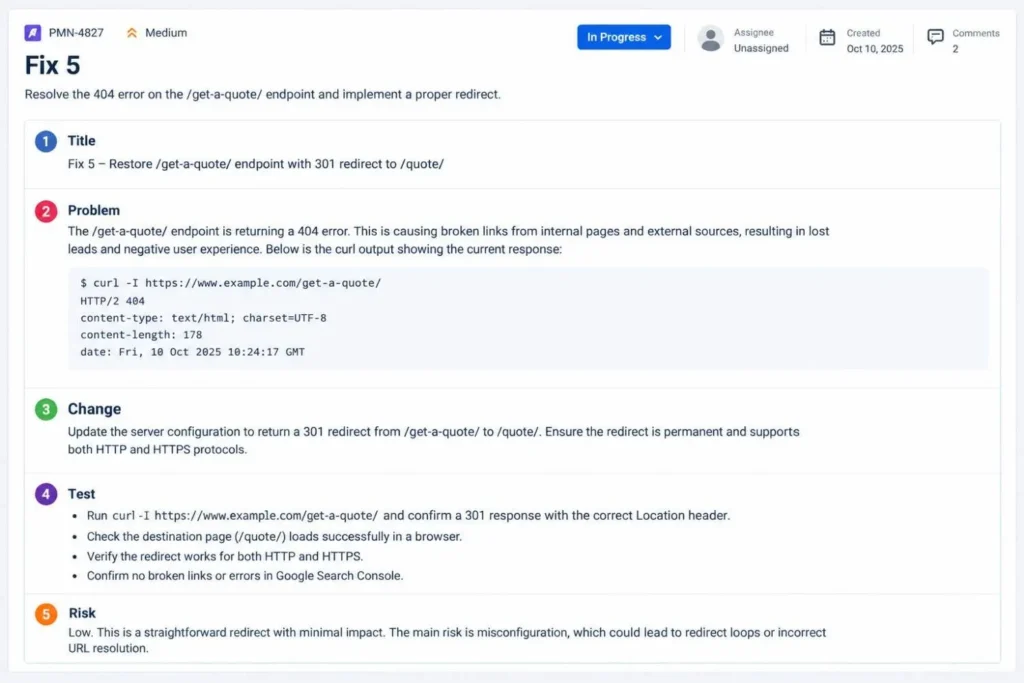
Nobody picks up a ticket called “Fix SEO on pricing.” Try this instead:
- Title: [Fix #] on [host or template]
- Problem: paste the curl output, or a screenshot of what a crawler gets
- Change: the exact header, tag, rule or rendering mode
- Test: the check from this post, so they know when they’re done
- Risk: anything that might break (a stray noindex on the marketing site is the scary one)
Frequently Asked Questions
What is technical SEO for SaaS?
The same crawl, render and index basics as any site, plus the boundary work. App, staging and login flows stay out of search. Pricing, features and docs stay readable.
Does Google index JavaScript-heavy SaaS sites?
Mostly. It renders on a delay, though, and anything behind a click or a flaky API call can get missed. AI crawlers usually stop at the first HTML response, which is why server rendering is the safer bet.
Should SaaS docs be on a subdomain or a subfolder?
Either works. If your docs already rank on a subdomain, I’d leave them there unless you’re rebuilding anyway.
Should my app live on a subdomain or the main domain?
Subdomain, in most cases. With app.yourbrand.com, one header keeps the whole thing out of Google. Once app routes are tangled into the marketing domain, that gets fiddly.
Can paid landing pages sit on a separate platform without hurting SEO?
Yes, if paid-only pages are noindexed or target different searches. Trouble starts when both platforms chase the same keyword and nobody’s looking at both.
Start With Four Commands
Curl your pricing page. Run a site: search on your app host. Reread robots.txt. Search a week of logs for OAI-SearchBot. That’s an hour, and it tells you if the rest of your SaaS SEO strategy is even being read.
Get a Free SaaS Technical SEO Check
Rather have us look? Request a free SaaS technical SEO check or book a 30-minute call. For the full job, our SaaS SEO agency pairs technical fixes with AI search optimization. Paradigm Media Networks: SEO, GEO & Ads, Engineered for the AI Era.
About the Author
Jahid Hussain | Founder, Paradigm Media Networks
Jahid Hussain founded Paradigm Media Networks to solve a problem he kept seeing: businesses spending across SEO, ads, and content that never talked to each other. He specialises in local SEO, organic growth systems, and integrated marketing strategies that connect search, paid media, and creative into one lead generation engine. Paradigm has taken clients from zero search visibility to six-figure monthly revenue pipelines, and has been featured in IANS, Eastern Herald, Sangri Times, and Dailyhunt. Jahid operates across the US, UK, UAE, and India, and writes from the standpoint of someone who has built and broken growth systems for real businesses, not from a slide deck.
