
HVAC service area pages: when to build one, and what goes on it
An HVAC service area page is a page about one town you serve, written to rank there and to show homeowners you really work there. Build one only where you have real jobs, something specific to say and search demand. Everywhere else, a strong service page covers the area better and keeps you clear of Google's doorway rules.
✓ Free audit · We show which towns you win and lose on a Map Pack grid
What is an HVAC service area page?
An HVAC service area page is a website page about the heating and cooling work you do in one town, suburb or county you travel to, as opposed to a page about a staffed office (a location page) or about one service across your whole area (a service page).
Key takeaways
- Google lets a Business Profile list up to 20 service areas and suggests keeping the overall area within about two hours of driving time. A service area page is the website's supporting evidence for a town, not something Google requires.
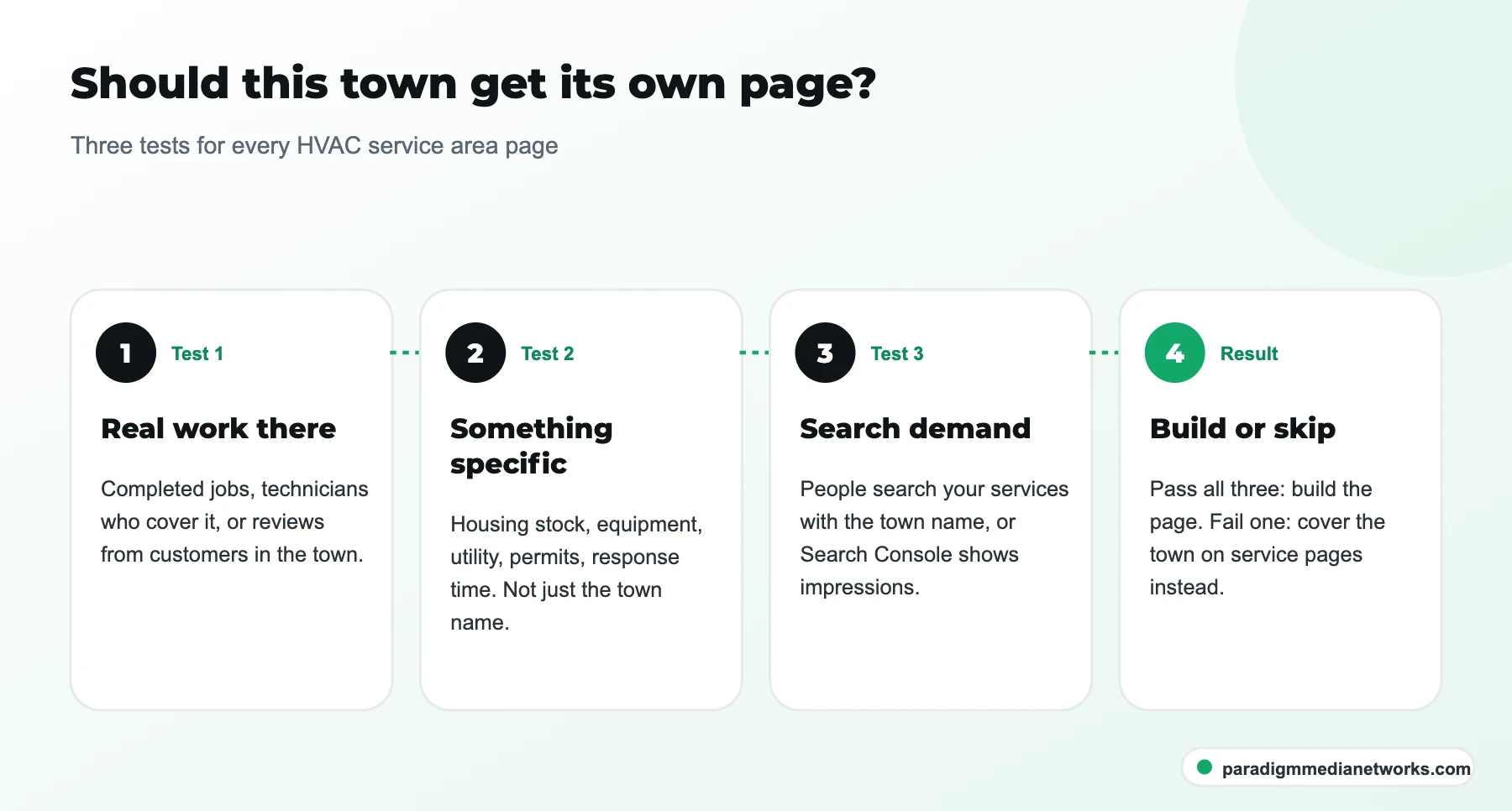
- Build a page only when a town passes three tests: you have real jobs there, you can say something specific about it, and people search for your services plus that town.
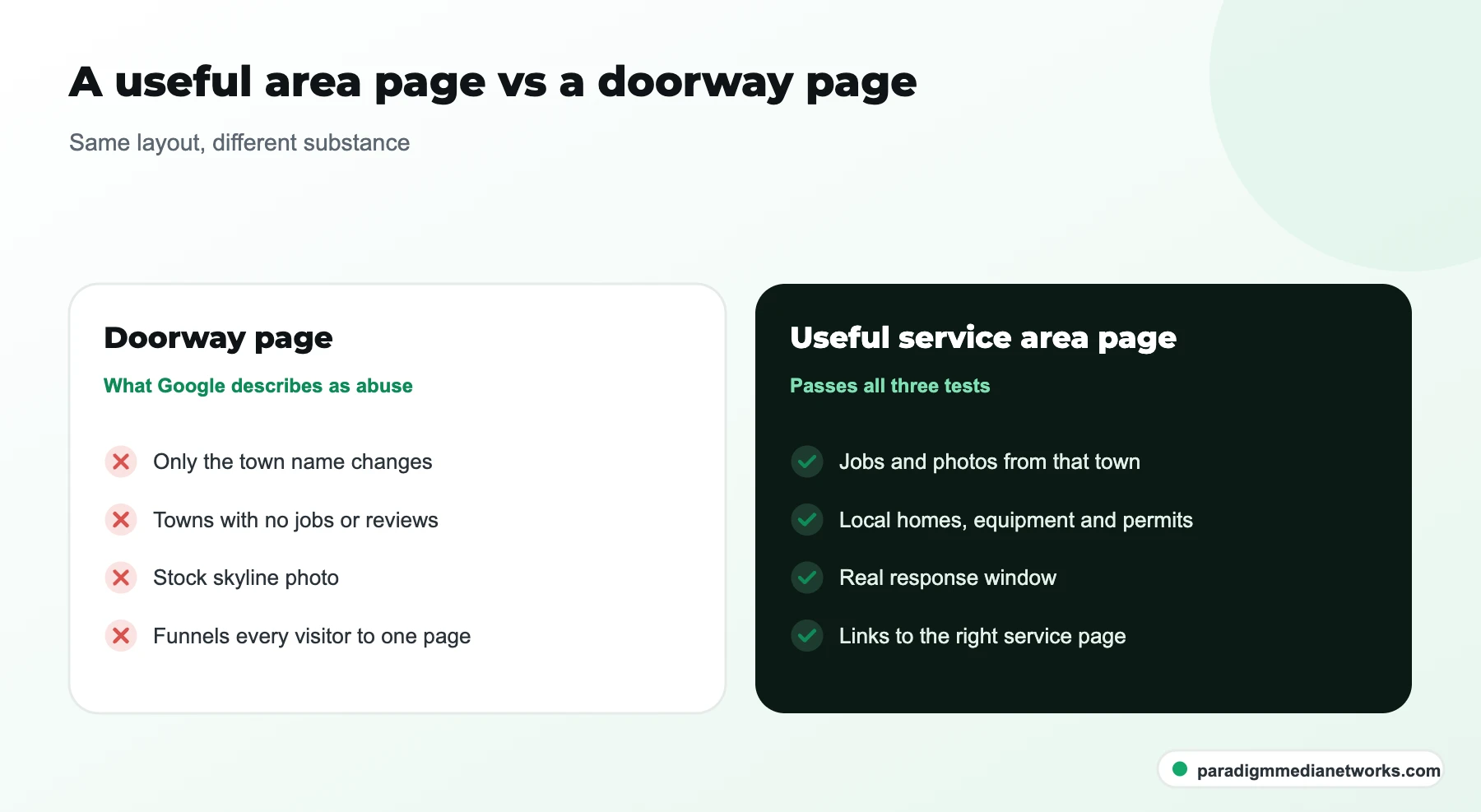
- Pages that differ only by the town name match the examples in Google's doorway abuse policy, including "pages targeted at specific regions or cities that funnel users to one page".
- A service area page helps organic rankings and conversions in that town. It cannot cancel out distance in the Map Pack, so measure it on a grid, not with one ranking.
Three page types get mixed up on HVAC websites, and the mix-up is where most thin pages come from:
| Page type | What it is about | When it fits |
|---|---|---|
| Service page | One service (AC repair, furnace replacement, heat pump installation) across your whole area | Every service with real demand. This is the page that usually ranks first. |
| Location page | A staffed office or shop with its own address and phone | Only for real branches, each with its own Business Profile |
| Service area page | All your work in one town or county you travel to | Towns that pass the three tests below |
If you are a service-area business with no storefront, Google says you must hide your business address on the profile. Your service area pages should follow the same logic: talk about the work you do in the town, not a street address you do not have there.
Does an HVAC company need a page for every town it serves?
No. An HVAC company needs a service area page for each town where it has real jobs, something specific to say and search demand. For the rest, list the towns on your service pages and in your Business Profile, and put the effort into making the service pages stronger.

The three tests, in the order we apply them:
- Real work there. You have completed jobs, technicians who cover it, or reviews from customers there. If you have never run a call in the town, a page about it is a claim you cannot back up.
- Something specific to say. Housing stock, the equipment you find there, the utility that serves it, permit rules, how fast you can realistically get there. If the only thing that changes is the town name, the page fails.
- Search demand. People search for your services with that town name, or Search Console already shows impressions for it. Our HVAC keyword list is a starting point for the service side of those searches.
| Situation | Build a page? | Why |
|---|---|---|
| The town your verified address is in | Usually no | Your homepage and service pages already target it. A separate page competes with them. |
| A suburb 10 to 20 miles out where you run jobs every week | Yes, if it passes test 2 | Distance works against you in the Map Pack there, so the website has to carry more of the relevance. |
| A town you want to break into but have no jobs in yet | No | Nothing true to say yet. Win a few jobs, collect photos and reviews, then build it. |
| A second county with a different utility or permit office | Yes | Different rebates and rules are exactly the specific content a homeowner needs. |
| Neighborhoods inside a town | Rarely | Mention them on the town page. Separate neighborhood pages almost always fail test 2. |
| Dozens of towns pulled from a ZIP code list | No | This is the pattern Google's doorway policy describes. |
Our view: most single-location HVAC companies need between zero and a handful of service area pages, not dozens. Our HVAC case study was a single-location contractor that went from 10 to 12 inbound calls a month to more than 80 within four months. That came from a rebuilt Business Profile, review velocity and seasonal page sets published ahead of each season, not from a large set of town pages.
Can a service area page get you into the Map Pack in another town?
Not on its own. Google ranks local results on relevance, distance and prominence, and a website page cannot change how far your business is from the searcher. What a good area page does is improve relevance, win organic results for town searches, and turn visits from that town into calls.
Google's own wording is plain: "Distance refers to how far each business is from the customer who's searching." For an HVAC company based on the north side of a metro, that means a homeowner 15 miles south may see three closer contractors in the Map Pack whatever your website says.
That is not a reason to skip area pages. It is a reason to set the right goal for them. The organic results under the Map Pack, and the AI answers above it, still need a page that clearly covers "furnace repair in [that town]". The area page is often the only page on your site that can.
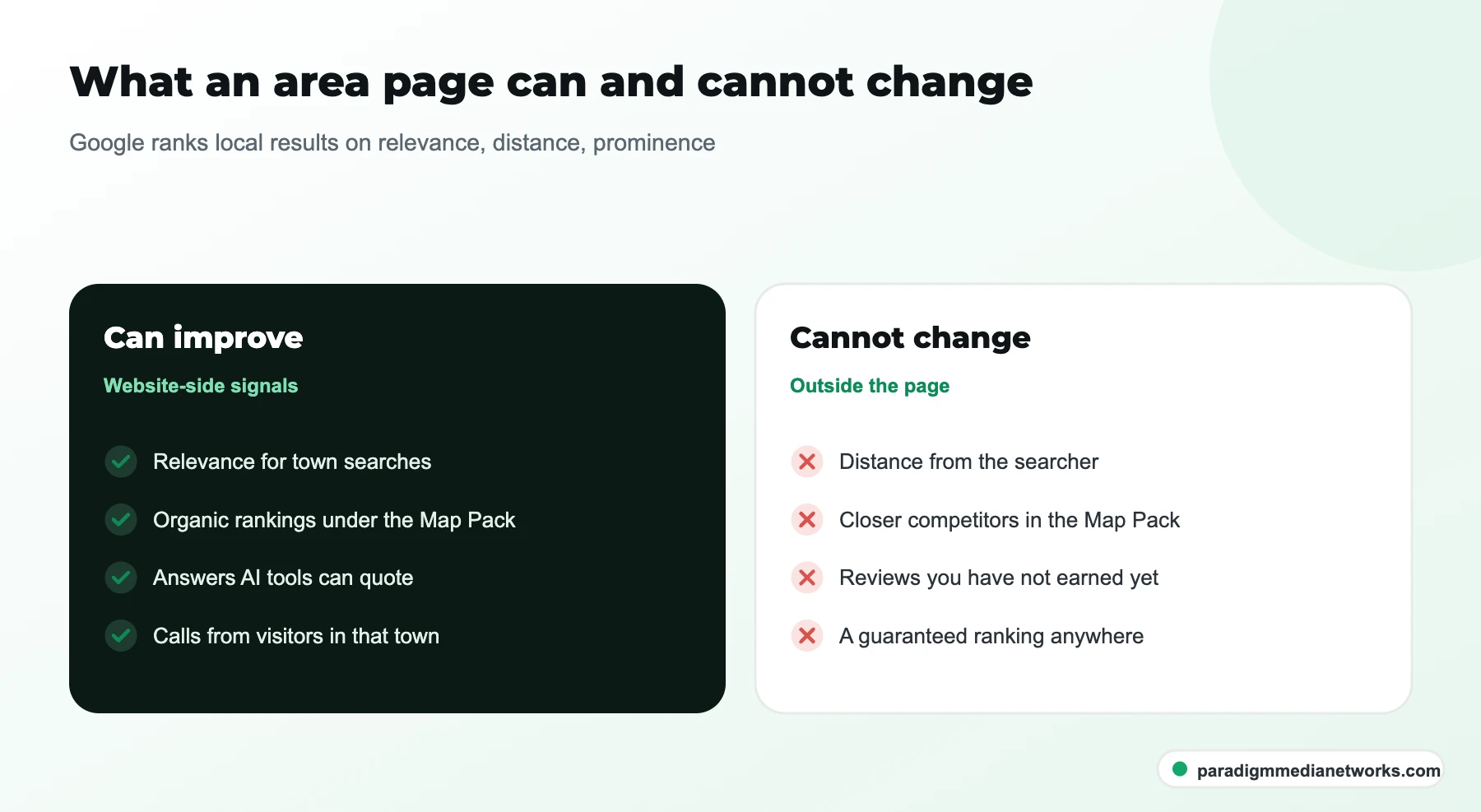
How we check it: before an area page goes live we run a Map Pack grid scan across the town for two or three core services, and we run it again 60 to 90 days after launch. If the grid has not moved but organic impressions and calls from the town have, the page is doing its job. Our guide to setting up a grid scan for an HVAC service area covers the method.
What goes on an HVAC service area page? A section-by-section template
A useful HVAC service area page answers what you do in the town, how fast you get there, what is different about homes and rules there, and what local customers say, then routes the reader to the right service page or to a call.
Use this order. Each block has a job, and each one should contain something that would be wrong on another town's page.
| Block | What to put in it | What makes it specific |
|---|---|---|
| Title and H1 | "Heating and cooling in [Town]" or "[Service] in [Town]" for a single-service page | The town name, once, naturally. No list of neighboring towns. |
| Opening answer | Two or three sentences: services you offer there, the response window you actually commit to, hours | A real response window for that town, not the one for your home base |
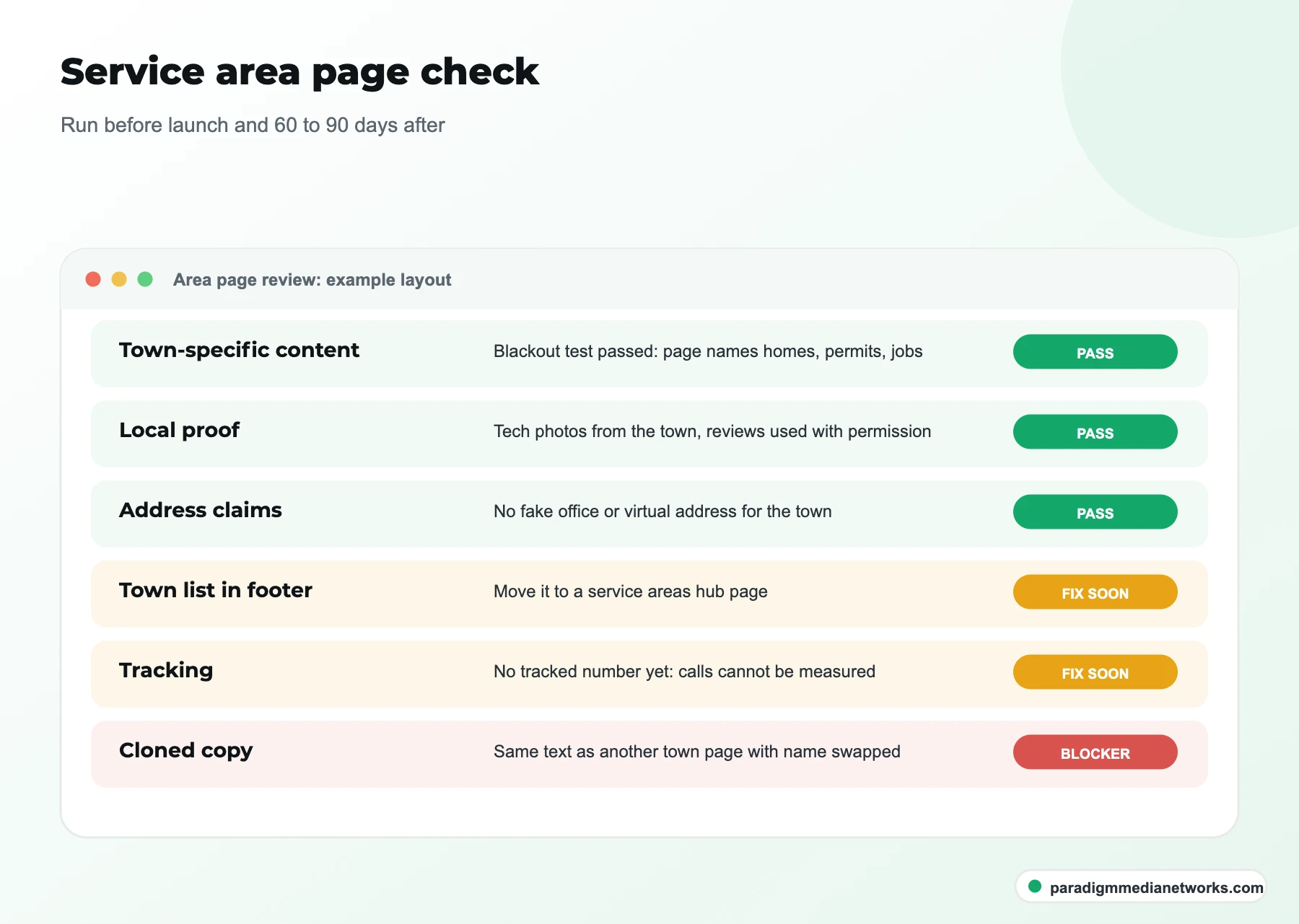
| Local proof | Jobs completed in the town, photos your technicians took there, reviews that mention it (with permission) | Proof only that town can supply |
| Homes and equipment | What you typically find: older gas or oil furnaces, newer heat pump builds, ductless retrofits | Your technicians' notes from real calls |
| Rules and money | Which utility serves the town, rebate programs, whether replacements need a permit there | Linked to the utility or city page, checked before publishing |
| Services | Short list of the services you run there, each linking to its service page | Only services you really offer in that town |
| FAQ | Three to five questions homeowners there ask your office | Taken from calls, not copied from another town page |
| Call to action | Phone number (tracked), booking link, service hours | A tracking number per page if you want to measure it |

Schema for a service area page
Mark up what the page actually says. A Service or HVACBusiness entity with areaServed set to the town is enough, and the business name, phone and services must match your Business Profile. Do not add review stars for reviews you collected yourself; Google does not show them for a business's own pages, and invented markup is worse than none.
A worked example: thin versus specific
Here is the same opening written two ways for a fictional town, Maple Ridge, to show what changes. The facts in the second version are illustrative; yours must come from your own jobs and local sources.
Fails test 2
"We proudly serve Maple Ridge with top-quality heating and cooling services. Our experienced team is ready to help with all your HVAC needs. Call today!"
Passes test 2
"We run AC repair, furnace replacement and heat pump installs in Maple Ridge most weekdays, usually same day for calls before noon. Many homes in the older streets still have original gas furnaces, so we carry common parts for those on every van. Replacements there need a permit from the city, which we pull for you."
The first version could sit on a thousand sites. The second could only be written by someone who works in that town, which is why a homeowner and a search engine both trust it more.
How do you gather the local facts for each page?
Get them from your own jobs and from official local sources, in about an hour per town: your job history, your technicians, the utility and permit pages, and the questions your office takes from that town.
- Pull the job history. Export completed jobs for the town from your field service software. Note the most common job types, the equipment ages you see and anything unusual.
- Ask the technicians. Ten minutes with the techs who cover it: what do they find in these houses, what slows them down, what do customers ask on the doorstep?
- Check the official sources. Find the utility that serves the town and its current rebate page, and the city or county permit rules for equipment replacement. Link to them rather than restating figures that change.
- Collect proof with permission. Job photos from that town and reviews that mention it. Ask the customer before you use their street or their words.
- Write, then test. Read the page with the town name blacked out. If you cannot tell which town it is about, it is not ready.

How many service area pages, and in what order?
Start with the two to four towns where you already run jobs, lose the Map Pack on the grid, and earn the most per job. Publish, measure for 60 to 90 days, then decide on the next town based on what moved.
The order matters more than the count. A practical sequence:
- Fix the service pages first. If your AC repair or furnace replacement pages are thin, area pages will link to weak destinations. Our on-page SEO guide for HVAC covers what those pages need.
- Run a grid scan across the whole area. Mark the towns where you are invisible for your core services.
- Overlay job value. Of those towns, which bring the best tickets: replacements, maintenance plan sign-ups, commercial work?
- Publish ahead of the season. A page about cooling work in a town should be live before the first heat, because Google needs time to crawl and trust it.
- Measure, then expand. Add the next town only when the first ones show impressions and calls.
This is the order we follow as an HVAC SEO agency: in our plans, area pages come out of the same page allowance as service pages, so a town has to earn its slot over another service page before we write it.
How should service area pages link to the rest of the site?
Each service area page should link down to the service pages for the work you do there, and up to your homepage or a service areas hub. Service pages should link back to the area pages where they have real local content. Keep URLs short and consistent.
Two URL patterns work: /service-areas/maple-ridge/ under a hub, or /maple-ridge/ at the top level. Pick one and stay with it. Service-in-town pages such as /ac-repair-maple-ridge/ only make sense for large towns where one service has enough demand and enough specific content of its own; for most HVAC companies they multiply thin pages.

- A service areas hub page lists every town you serve, including the ones without their own page, so nothing is hidden and nobody needs 40 thin pages.
- Your Business Profile can link to the homepage or to the most relevant service page. Do not create extra profiles for towns where you have no staffed location; Google asks for one profile per metro you serve.
- Blog posts about a town-specific problem (a local rebate change, a cold snap) can link to that town's page.
- Keep your business name, phone and services identical across the site, the profile and directories. Our HVAC citations list covers where they need to match.
What are the most common service area page mistakes?
The common mistakes are cloning one template across dozens of towns, listing towns you do not really serve, claiming offices you do not have, and publishing pages with no way to measure them.
| Mistake | Why it fails | What to do instead |
|---|---|---|
| One template, 40 towns, name swapped | Matches Google's doorway examples; Google also assumes new pages match the quality of the rest of the domain | Fewer pages, each passing the three tests |
| A block of town names in the footer or page body | Reads as keyword stuffing and helps nobody | A service areas hub page with a plain list |
| A fake local address or a virtual office per town | Breaks Google's Business Profile rules and risks suspension | Hide the address if you are a service-area business; talk about the work, not an office |
| Stock photos of a skyline | Says nothing about your work there | Photos your technicians took on jobs in the town |
| No tracking | You cannot tell if the page earns calls | A tracking number or tagged form per page, and a grid scan before and after |
Do service area pages help with ChatGPT and AI Overviews?
They can, when they state clear, specific facts about the work you do in a town. AI tools pull business facts from your site and from directories, so a page that plainly says which services you run in a town, how fast you respond and what you charge for a diagnostic is easier to quote than a generic one.
AI search is now part of local discovery: BrightLocal's Local Consumer Review Survey 2026 found 45% of US consumers had used ChatGPT or another AI tool for local recommendations, up from 6% the year before. The same rules apply as for Google: consistent facts, specific answers, nothing hidden in images. Our guide to AI SEO for HVAC companies goes deeper, and the free AI visibility checker shows whether AI tools name you today.
HVAC service area pages: FAQ
How many service area pages should an HVAC company have?
As many as there are towns that pass three tests: real jobs there, something specific to say, and search demand. For most single-location HVAC companies that is a handful, not dozens. Start with two to four towns where you lose on the Map Pack grid and earn the most per job, then add more as the first ones show results.
Can I use the same template for every town?
You can use the same structure, but not the same content. The blocks can repeat: opening answer, local proof, homes and equipment, rules and rebates, services, FAQ. What goes inside each block must be specific to the town. If a page still makes sense after you swap the town name, it matches the pattern Google's doorway policy describes.
Should a service-area HVAC business put an address on its area pages?
No, not an address you do not have. If you have no storefront, Google says you must hide your address on the Business Profile. Area pages should describe the work you do in the town, your response times and your local proof. Never create a virtual office or a fake address per town.
Will a service area page get me into the Map Pack in that town?
Not on its own. Google ranks local results on relevance, distance and prominence, and a page cannot change distance. A good area page improves relevance, can rank in the organic results for town searches, and converts visitors from that town. Track it with a grid scan before and 60 to 90 days after launch.
What is the difference between a service area page and a location page?
A location page is about a staffed office or shop with its own address, phone and Business Profile. A service area page is about a town you travel to from somewhere else. Only real branches should have location pages; towns you serve from your base get service area pages, and only when they pass the three tests.

One team, one revenue number
Strategy is led by Jahid Hussain, founder of Paradigm Media Networks, with 7 years in growth marketing, SEO and performance marketing and an MBA in Marketing. SEO, AI search, paid media, content and web run as one system, so nobody hands you a report that contradicts another vendor’s.
- 500+ marketers trained and 30+ brands scaled
- Published results you can check: HVAC case study and Moving Hub case study
- Reporting on calls, leads and booked jobs, not just rankings
Find out which towns deserve a page
Send us your website and the towns you serve. We will run a Map Pack grid across your area, show where you disappear, and tell you which towns are worth a page and which are not.
✓ Free 30-minute call · No pitch decks · Walk away with a real plan
What you walk away with
- A Map Pack grid read across the towns you serve
- The towns that pass the three tests, and the ones that do not
- The service pages to fix before any area page
- Whether AI tools name you today